
Getting started
Open Nabd from WAJ, find your way around the menu, search everything and open Nabd AI.
Nabd opens from the WAJ app — you don't need a separate login. This page covers your first few minutes.
Open Nabd from WAJ
- Open WAJ.
- Go to Settings › WAJ Nabd, or tap the Nabd button on a booking.
- Nabd opens on Today.
Language, dark mode, support and log out
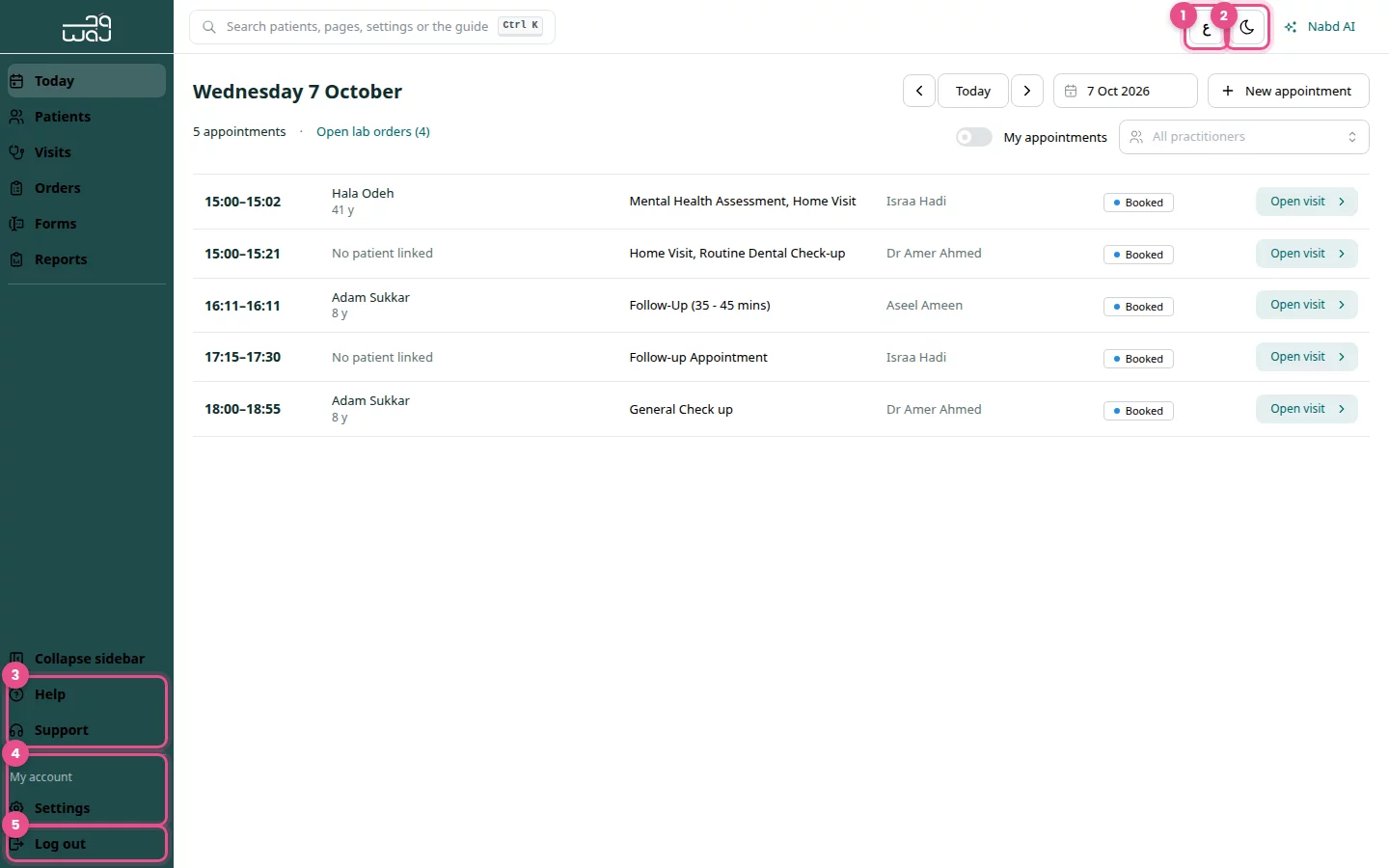
These are in the menu on the left and the buttons at the top right.
- Click ع at the top right to switch to Arabic (EN switches back).
- Click the moon button (Dark mode) for a darker screen.
- At the bottom of the menu, click Help for help pages, or Support to message WAJ support on WhatsApp.
- Under My account, click Settings to open Clinic settings.
- Click Log out when you finish.
Search everything
One search box finds patients, pages, settings and help.
- Click the search box at the top, or press Ctrl K from any page.
- Type a patient's name, phone number or patient ID, an order number (RX-… or LAB-…), or a page or setting such as "team".
- Use the arrow keys and press Enter to open a result, or click it.
- Quick actions such as New appointment and New prescription are listed too.
- Or choose Ask Nabd AI to send what you typed to the assistant.
Open and close Nabd AI
- Click Nabd AI at the top right to open the assistant panel.
- Click Close Nabd AI to hide it again.
See Ask Nabd AI for what it can do.
Good to know
- Click Collapse sidebar to shrink the menu to icons.
- Settings shows only for people who manage the clinic. Your language choice applies only to you.
- If Nabd says you have no access, see Troubleshooting and FAQ.
Follow WAJ on Google
Add WAJ as a preferred source to see more of our articles in your Google Search results, marked with a "preferred" badge.