
WAJ Nabd
Learn what Nabd is, how it works with WAJ, and find your way around the screen.
Nabd is the clinical app for your clinic. You book clients in WAJ; you see patients, write notes, prescribe and order labs in Nabd. Appointments booked in WAJ appear in Nabd automatically, and patients are added when a client books a clinic service.
How Nabd fits with WAJ
- WAJ handles bookings, payments and checkout.
- Nabd holds the clinical record: visits, notes, prescriptions, lab orders, forms and photos.
- Nabd AI is the assistant built into Nabd. It answers questions about the open patient and helps you write notes.
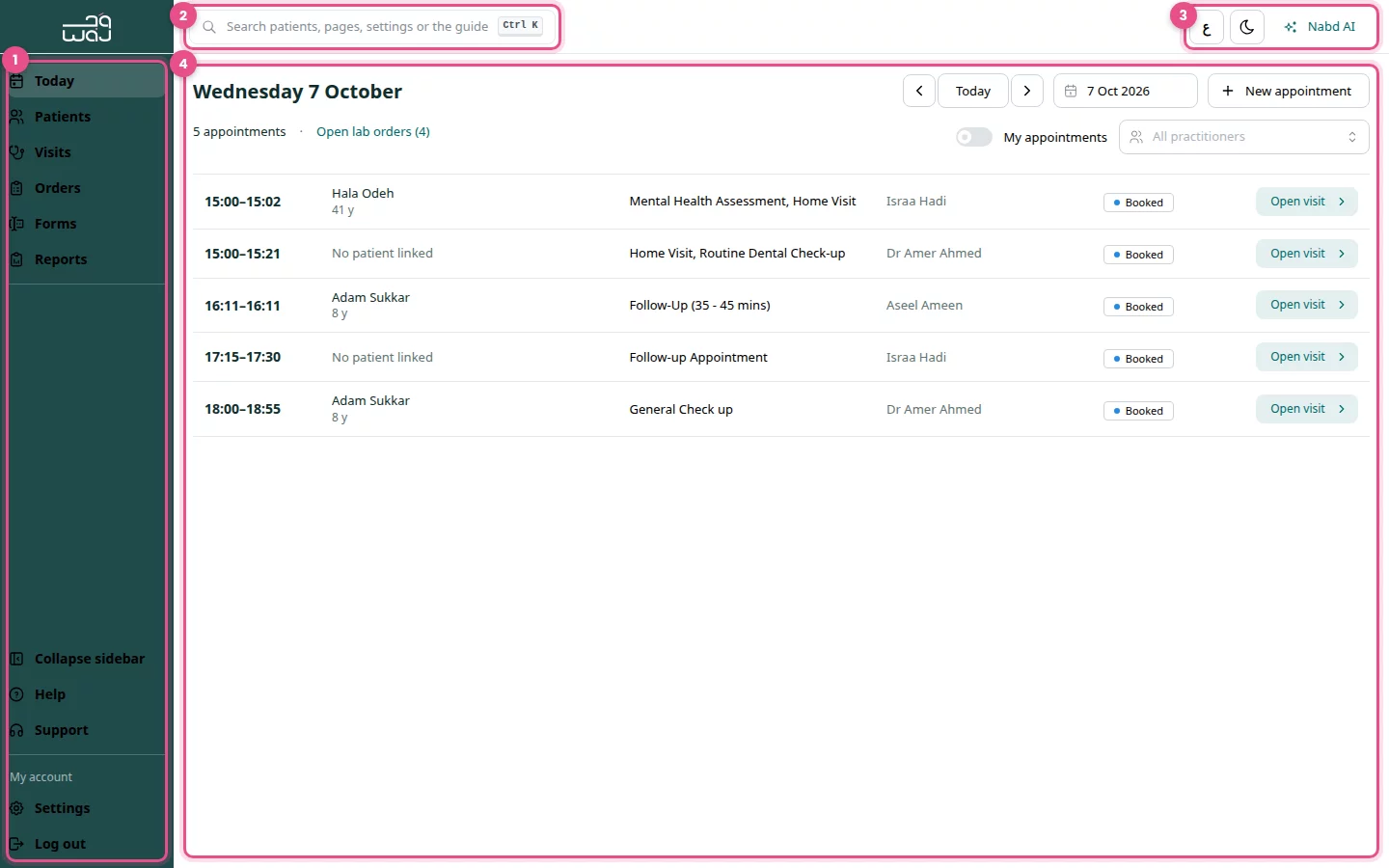
The screen at a glance
- The menu on the left: Today, Patients, Visits, Orders, Forms and Reports. At the bottom: Help, Support, then Settings (opens Clinic settings) and Log out under My account.
- Search at the top: find patients, orders, pages, settings and help. Press Ctrl K from anywhere.
- The buttons at the top right: language (ع / EN), Dark mode, and Nabd AI, which opens and closes the assistant panel.
- The page area: the page you are working on.
Guide pages
Follow WAJ on Google
Add WAJ as a preferred source to see more of our articles in your Google Search results, marked with a "preferred" badge.