
Record a visit with the AI scribe
Record the consultation and let Nabd AI draft the clinical note for you to review.
The AI scribe listens to the consultation and drafts the note. You review and save it — nothing is saved without you.
Record a visit
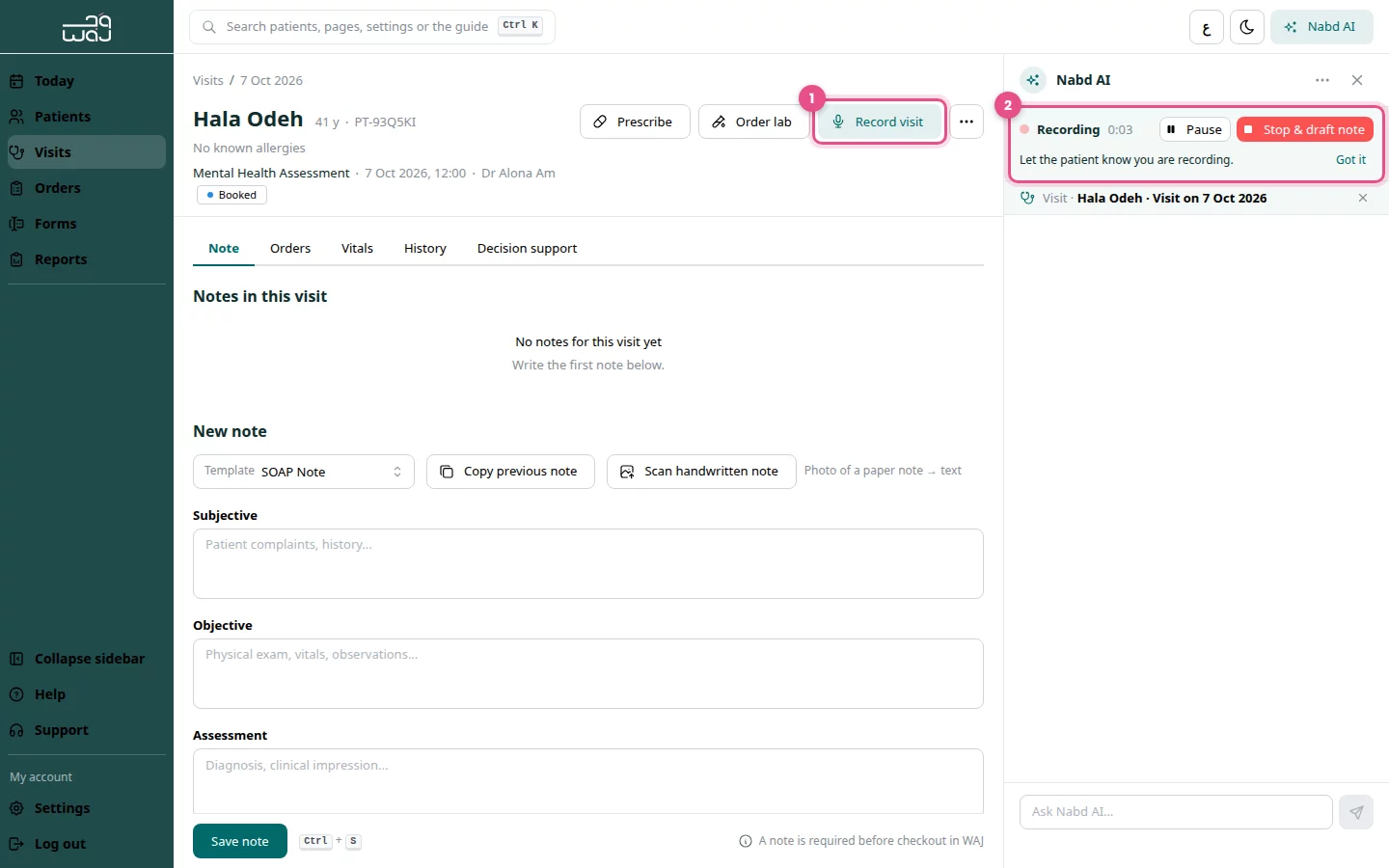
- Open the visit and click Record visit. Nabd AI opens.
- Tell the patient you are recording, then click Got it.
- Allow the microphone if your browser asks.
- Talk with the patient as usual. The banner shows Recording and the time.
- Click Stop & draft note when the consultation ends.
- Nabd AI drafts the note. Click Review & save, check every section, then save it.
Pause the recording
- Click Pause for anything that should not be in the note.
- Click Resume to continue.
The banner shows Paused while recording is paused.
Good to know
- Always get the patient's consent before you record.
- The draft is written in your AI response language. Change it in Clinic settings › My preferences.
- Read the draft carefully. You are responsible for the final note.
Follow WAJ on Google
Add WAJ as a preferred source to see more of our articles in your Google Search results, marked with a "preferred" badge.