
End of Day Report
Overview
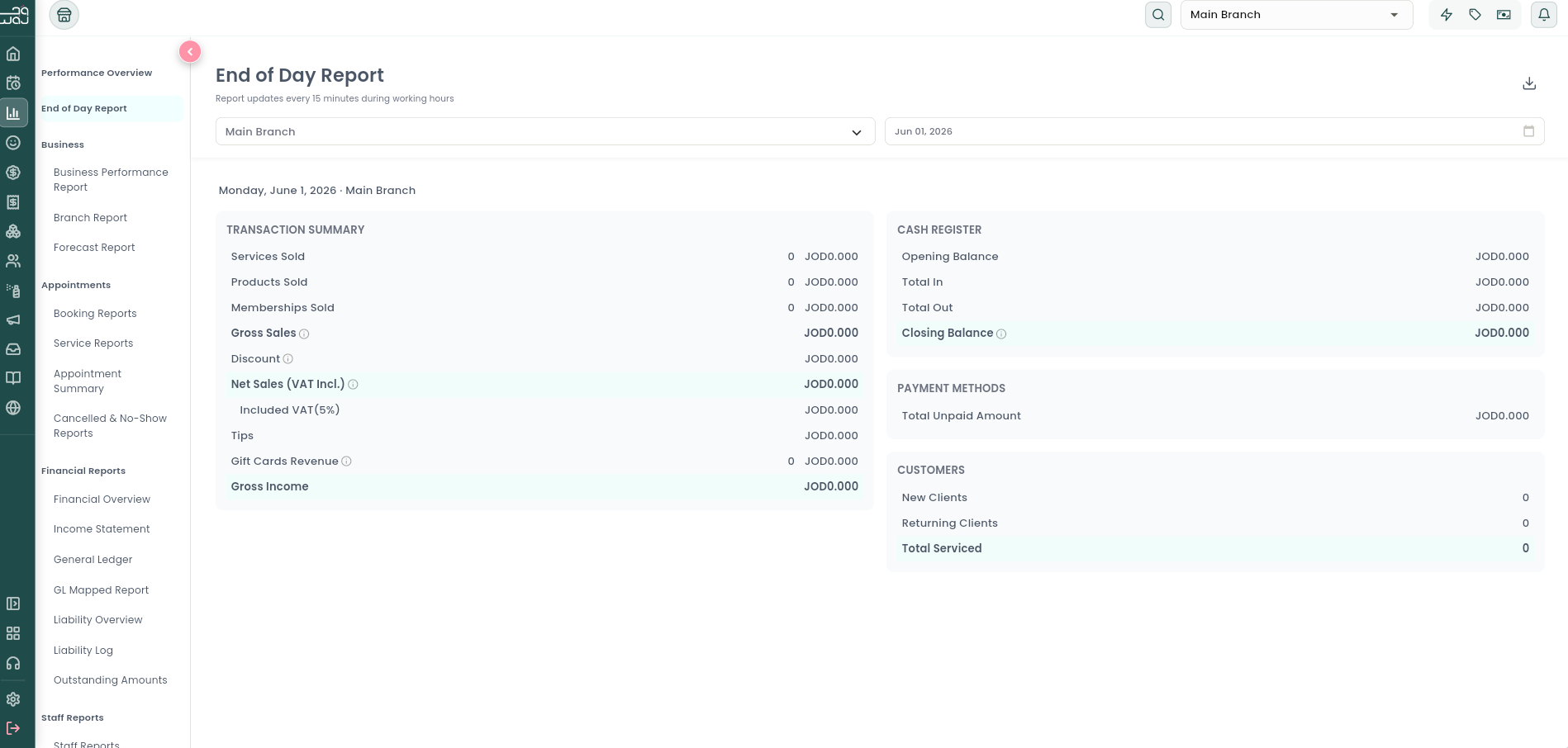
The End of Day Report summarises a single day's takings for one branch. It's the report most owners check before closing up, and the one used to reconcile the cash drawer.
What it shows
The report shows the full Sales Hierarchy breakdown for that one day — Gross Sales, Discounts, Net Sales, VAT, Tips, Other Income, and Gross Income — plus:
- Payment Methods breakdown (cash, card, etc., for however many payment methods you accept). Cash entries reconcile automatically: the balance you started the day with, plus everything added, minus everything taken out, always equals your closing balance — so if that doesn't match what's physically in the drawer, you know to double-check a transaction.
- Total Unpaid Amount.
- New Clients / Returning Clients / Total Serviced for the day. These are transaction-based counts — a client only shows up here if they actually had a paid sale or booking that day. "New" means their registration date is the same day as this transaction; "returning" means they registered on an earlier day.
See the Sales Hierarchy topic for exactly how Gross Sales, Net Sales, and Gross Income are calculated, and the Reports Overview topic for why this transaction-based client count differs from the registration-based counts shown on Performance Overview.
How to use it
Open the End of Day Report, then use the branch selector and the single-day date picker at the top to choose the location and the day you want to reconcile. The report reloads for the selected day. Use the download icon to export the figures to PDF (for printing/filing), CSV, or Excel.
Notes & limitations
The report requires the View end of day report permission. Figures cover the selected day only; use the Business Performance Report or Financial Reports for multi-day periods. The cash and payment-method figures are intended to be matched against the physical till count during closing.
Follow WAJ on Google
Add WAJ as a preferred source to see more of our articles in your Google Search results, marked with a "preferred" badge.