
Staff Time Off and Goals
Overview
Beyond regular shifts, each staff profile lets you record time off (leave) and set a performance goal. Both are reached from the staff member's profile, under Time Off and Staff Goals.
Time off
From a staff member's Time Off section, add an entry with:
- Type: Sick Leave, Governmental Papers, Maternity Leave, or Other.
- Period: a start and end date.
- Start time / End time (optional), leave blank to block the whole day(s), or set a specific window to block only part of the day.
- Reason/note (optional).
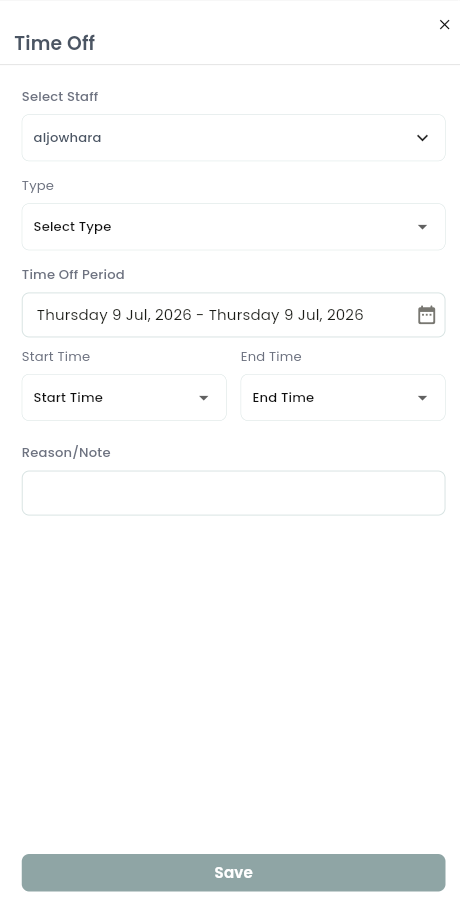
Approved time off always takes priority over the person's normal working hours. It blocks them from being booked online or on the calendar for that entire period.
Staff goals
Each staff member can have one active performance target at a time:
- Goal type: Revenue or Bookings.
- Interval: Daily, Weekly, or Monthly.
- Target value.
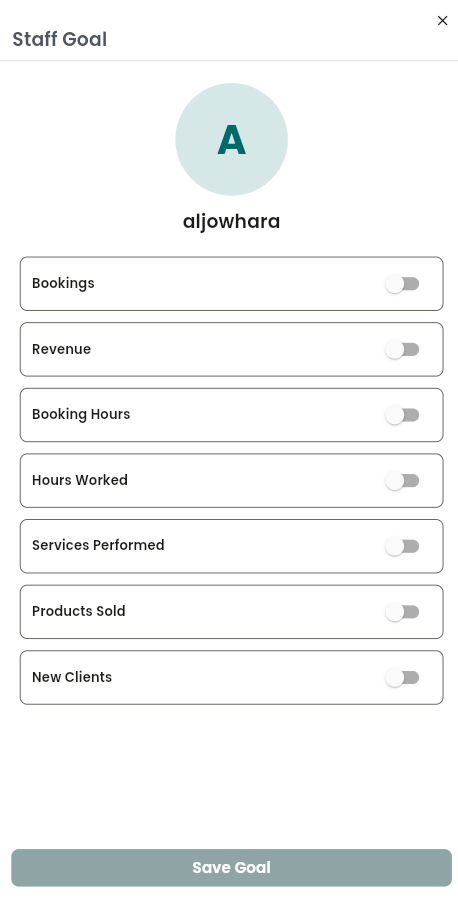
Once set, their profile shows progress toward the goal instead of a prompt to add one. You can edit or delete a goal at any time (this needs the right permission, your account owner or manager can grant it).
Notes & limitations
A staff member with no goal set shows a "no goals added" state until you add one. Time-off types are limited to the predefined list. Both time off and goals are managed per staff member.
Follow WAJ on Google
Add WAJ as a preferred source to see more of our articles in your Google Search results, marked with a "preferred" badge.