
Activity Log Timeline
Overview
Every booking and sale keeps a running history of what's happened to it, so you can always see who did what and when. The Activity Log is a timeline that appears inside a booking's details and a sale's checkout details, giving staff a clear audit trail for that specific record.
Where to find it
- On a booking: open the booking's details and tap View Activity to see its Booking Activity timeline.
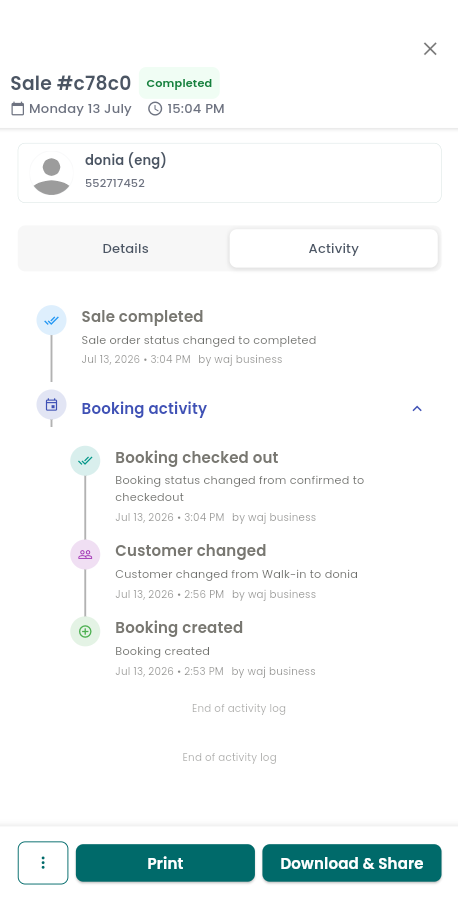
- On a sale: open the sale or checkout details. You'll find an expandable section showing the related booking's activity, plus a separate section for the sale's own activity, shown alongside its payment breakdown.
What gets tracked
For bookings, the log captures each step in its lifecycle along with any changes made along the way, including:
- Status changes — created, confirmed, cancelled, checked out, no-show, rescheduled, in progress, waiting, booked, pending.
- Edits — service added or removed, staff changed, time or date changed, price changed, discount applied, package added or removed, customer changed, notes changed, duration changed.
- Payment activity — payment processed, refund issued, partial payment, tip added.
For sales, the log tracks its own lifecycle, including: booking added to sale, sale created, sale completed, sale voided, sale merged, sale partially paid, sale unpaid, sale refunded.
Each entry is color-coded and paired with an icon so you can scan the timeline quickly — for example, completed actions appear in green, while cancellations and refunds appear in red.
Reading an entry
Each entry in the timeline shows:
- The action that happened (for example, "Price changed").
- Additional details, when available.
- The date and time it happened, in your local time.
- Who made the change, when that information is available.
Notes & limitations
The log shows your most recent activity first, with an "End of activity log" note letting you know when you've reached the bottom. The timeline is scoped to the single record you are viewing — it is not a business-wide audit report — and there is currently no way to filter it by action type or date.
Follow WAJ on Google
Add WAJ as a preferred source to see more of our articles in your Google Search results, marked with a "preferred" badge.