
Messaging Credits
Overview
Messaging Credits are WAJ's pay-as-you-go currency for sending marketing messages. If your WhatsApp is connected through your own WhatsApp Business number, your WhatsApp sends generally don't consume credits — credits mainly apply to Email broadcasts and to WhatsApp sends that go out over WAJ's shared sending path.
Where to find it
Tap the credit balance chip at the top of the Broadcasts screen to open the Messaging Credits dashboard.

Credits Dashboard
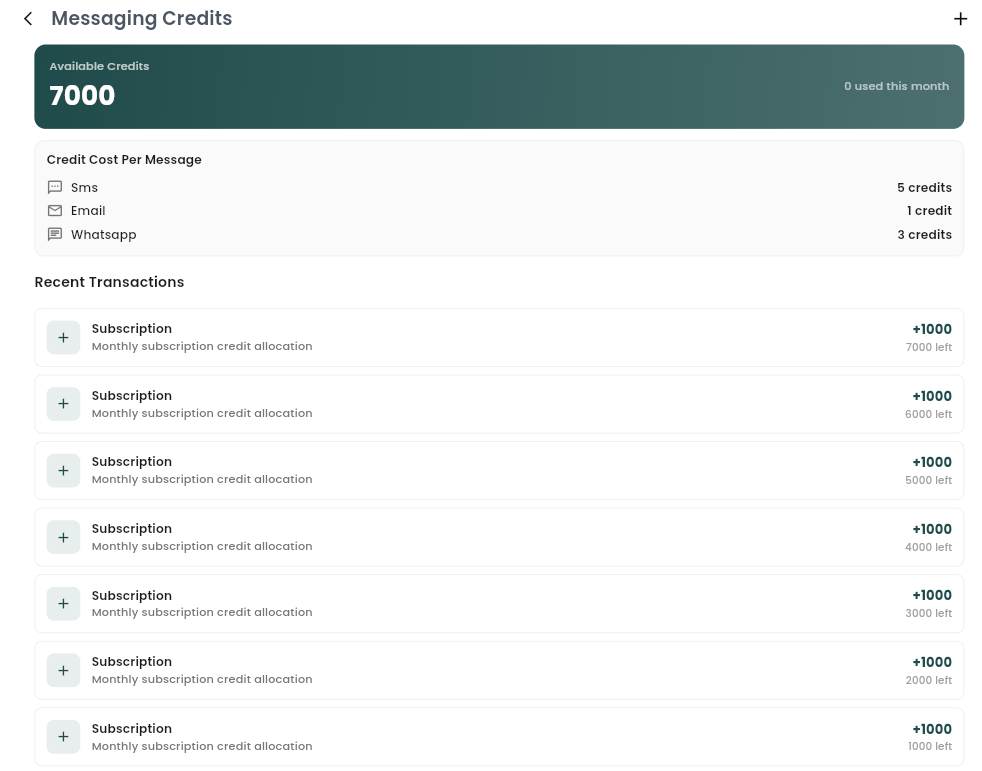
- Available Credits — your current balance, plus how many you've used this month.
- Credit Cost Per Message — how many credits each channel costs per message (email, WhatsApp, SMS), so you know the cost before you commit.
- Recent Transactions — a running history of every credit movement: purchases (credits added) and consumption (credits deducted per campaign send), each showing the amount and your balance right after.
How credits are consumed
When you build a Broadcast, WAJ shows you up front how many credits the send will cost and whether your balance covers it — a green notice confirming the broadcast will use a certain number of credits, or a red "insufficient credits" warning if you're short, with the option to top up before sending.
Buying credits
From the Credits Dashboard, tap + in the top-right to browse available credit packs — each showing its name, number of credits, total price, and price-per-credit. Tap a pack to check out on a secure external payment page; once payment completes, return to WAJ and your balance refreshes automatically.
Notes & limitations
- Credit costs differ by channel and are defined per business.
- Businesses that send WhatsApp through their own connected number are typically not charged credits for those sends; Email and shared-path WhatsApp sends are.
Follow WAJ on Google
Add WAJ as a preferred source to see more of our articles in your Google Search results, marked with a "preferred" badge.