
Service Catalog
Overview
Your services menu is what customers actually book: your service categories, the individual services inside them (with prices, durations, and rules), and the inventory products those services consume.
Where to find it
Settings → Business Details → Services, or your dedicated Services screen (its exact location depends on your business type).
Categories
Group your services into categories, Hair, Nails, Massage, Classes, and so on. Add, rename, reorder, and activate or deactivate categories at any time. Deactivating a category hides everything in it from online booking without deleting any of your data.
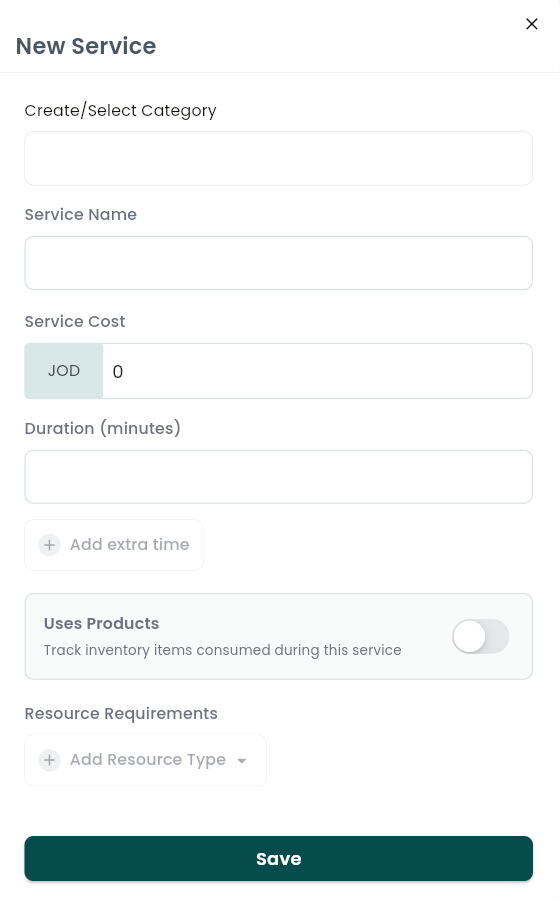
Creating or editing a service
Each service includes:
- Name and an optional description, tap Generate with AI and WAJ writes a short, professional description based on the service name.
- Category it belongs to.
- Price (with currency).
- Duration in minutes: the time blocked on the calendar and in online booking for this service.
- Extra time blocks: Processing Time (like hair color developing), Blocked Time, or Extra Servicing Time before or after the main service. Each is timed independently and reorderable, so you can extend how long a staff member or resource is held for a booking without changing the duration your customer sees.
- Variations: optional sub-options under one service, each with its own name, price, and duration (for example, "Short Hair" vs. "Long Hair" pricing on the same haircut).
- Staff-specific pricing: charge a different price for specific staff members (a senior stylist, for instance) while everyone else uses the base price. See Charging More for a Senior Stylist (Staff-Level Pricing) for details.
- Product usage: link inventory products the service consumes per booking, with quantity tracked, so stock deducts automatically when a booking is completed.
- Resource requirements: link any equipment or rooms the service needs.
- Active/inactive toggle: inactive services disappear from booking but keep their full history.
Notes & limitations
A service's duration, plus any extra time blocks, is exactly what gets reserved on the calendar for that staff member or resource. Deactivating a service or category removes it from online booking immediately, but doesn't affect appointments already booked. Per-branch service availability further filters which of these services actually show up at each location.
Follow WAJ on Google
Add WAJ as a preferred source to see more of our articles in your Google Search results, marked with a "preferred" badge.