
Connect your salon, spa or clinic to Claude and ChatGPT
Ask about your bookings, sales and team, and make changes in WAJ, from the AI app you already use.
Server URL
https://mcp.waj.ai/mcp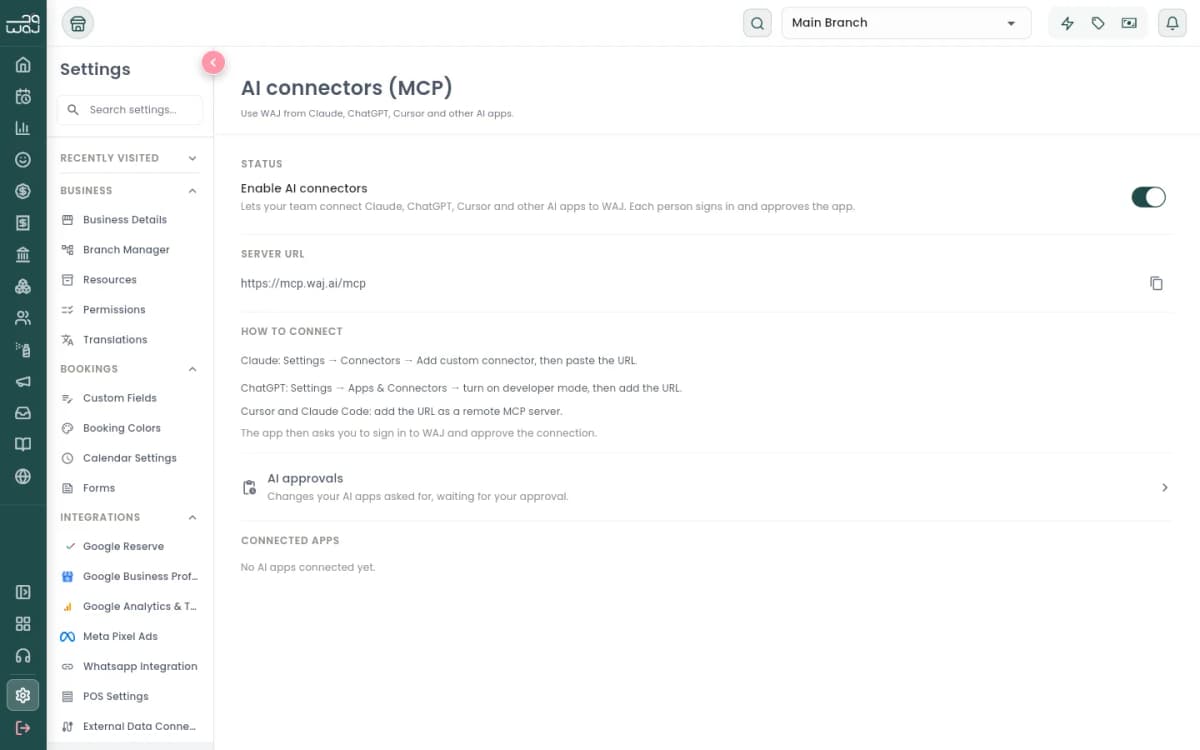
Examples
Ask in your own words
WAJ answers from your own data, for the branches and records your role can see.
- “What’s booked tomorrow, and who is working?”
- “Find a free 60-minute slot with Sara on Thursday.”
- “Block Sara’s calendar tomorrow from 2 to 4 pm for training.”
- “How did this month compare with last month?”
- “Which services sold the most in the last 30 days?”
- “Export this month’s invoices to a CSV file.”
- “Who are my top 10 clients by spend this year?”
- “Which clients haven’t been back in 90 days?”
- “Find duplicate client records and merge them.”
- “Which staff member had the most bookings last week?”
- “Add a day off for Ahmed next Monday.”
- “Add a 45-minute express facial at AED 250.”
- “What do I need to reorder?”
- “Create an audience of clients who spent over AED 2,000 this year.”
- “Build a win-back workflow for clients who haven’t visited in 60 days.”
Setup
Connect in three steps
Each staff member connects with their own WAJ login and gets the access their role allows.
Turn on AI connectors in WAJ
The business owner opens Settings → AI connectors (MCP) in WAJ and switches on Enable AI connectors. This is done once for the whole business.
Add WAJ to your AI app
In Claude, add WAJ from the connector directory. In ChatGPT, Claude Code or Cursor, add the server URL.
https://mcp.waj.ai/mcpSign in and choose the access
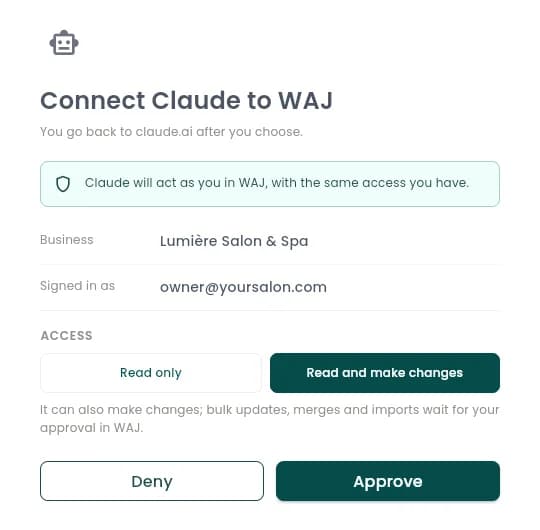
Sign in with your WAJ account, choose Read only or Read and make changes, and select Approve.
Permissions and safety
You decide what the AI app can do
- Your role sets the limits
- The AI app acts as you, with the same access your WAJ role gives you. Owners choose which roles can use WAJ AI in Settings → Permissions.
- Read only, or read and make changes
- You choose when you connect. Read only lets the AI app look things up without changing anything.
- Changes are confirmed in the chat
- Claude and ChatGPT ask before every change, so you can check it first.
- Bigger changes wait for you in WAJ
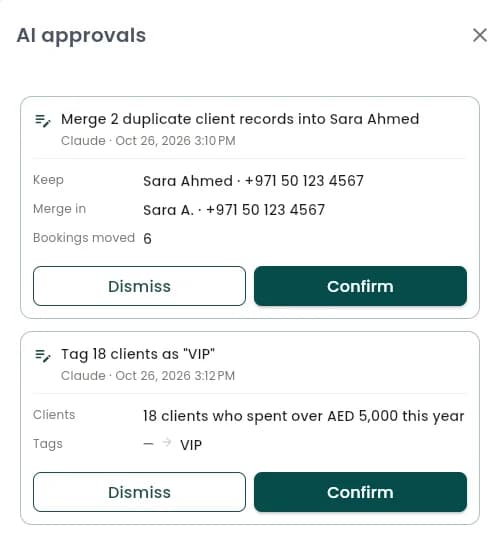
- Bulk updates, merges, imports and anything customers will see, such as sending a campaign, wait under AI approvals until you confirm them. Requests expire after 24 hours.
- No money movement
- Refunds, payouts and other money transfers are not available to AI apps.
- Revoke at any time
- Connected apps lists every AI app, who connected it and when it was last used. Revoke one, or turn off AI connectors to stop them all at once.
Built-in workflows
Six ready-made reviews
Each one turns your WAJ figures into a review you can act on. Run it from the WAJ menu in Claude, or ask for it in your own words in any app.
- Sales analysis
- Revenue against the previous period, best and declining services, payment methods and money still owed.
- Staff performance
- Revenue, bookings, booked versus scheduled hours and client retention for each staff member.
- Business trends
- Weekly revenue over the last 8 weeks, rising and falling services, new versus returning clients and next week’s bookings.
- Daily briefing
- Today’s bookings by staff member, yesterday’s sales, money owed and gift cards expiring this week.
- Client retention
- Returning clients, how new clients hold up month by month, and clients at risk, with a win-back audience when you ask for one.
- Stock check
- Out-of-stock and low-stock items, product sales by category and product cost per service.
Supported apps
Works with the AI apps you use
- ClaudeSetup steps
Listed in Claude’s connector directory. Works on the web, desktop and mobile.
- ChatGPTSetup steps
Add WAJ as a custom MCP server in ChatGPT on the web.
- Claude Code
Add WAJ from the terminal, then run /mcp to sign in.
claude mcp add --transport http waj https://mcp.waj.ai/mcp - Cursor
Add the server URL as a new MCP server in Cursor’s settings and sign in when asked.
https://mcp.waj.ai/mcp
FAQ
Questions about AI connectors
What is the WAJ AI connector?
It is WAJ’s MCP server at https://mcp.waj.ai/mcp. MCP (Model Context Protocol) is the standard that Claude, ChatGPT and other AI apps use to connect to business software. Once connected, the AI app can look up your WAJ data and, if you allow it, make changes for you.
Which AI apps work with WAJ?
Claude, ChatGPT, Claude Code and Cursor. WAJ only accepts sign-ins from AI apps on its supported list.
What do I need to get started?
A WAJ business account with AI connectors switched on by the owner, a role with the WAJ AI permissions (Access AI data to look things up, Perform AI actions to make changes), and an account with the AI app.
Can my staff connect too?
Yes. Each person connects with their own WAJ login and gets the access their role allows. Owners see every connection under Connected apps; other staff see their own.
What can the AI app change?
With Read and make changes, it can create and move bookings, update services, packages and memberships, set working hours and block time, add clients and notes, and build audiences and marketing workflows. Bulk and customer-facing changes wait for your approval in WAJ.
Can the AI app issue refunds or move money?
No. Refunds, payouts and other money transfers are not available to AI apps.
What happens to my clients’ data?
The AI app only receives what its requests return, such as the report or client list you asked for, and only for the business you approved. That data is then handled under the AI provider’s own terms. You can revoke access at any time.
Can I ask in Arabic?
Yes. Ask in Arabic or English and the AI app replies in the language you use. Service, staff and client names appear as they are saved in WAJ.
New to WAJ?
WAJ runs bookings, payments, staff, inventory and marketing for salons, spas and clinics.