
Connect your salon, spa or clinic to Claude and ChatGPT
Ask about your bookings, sales and team, and make changes in WAJ, from the AI app you already use.
Server URL
https://mcp.waj.ai/mcp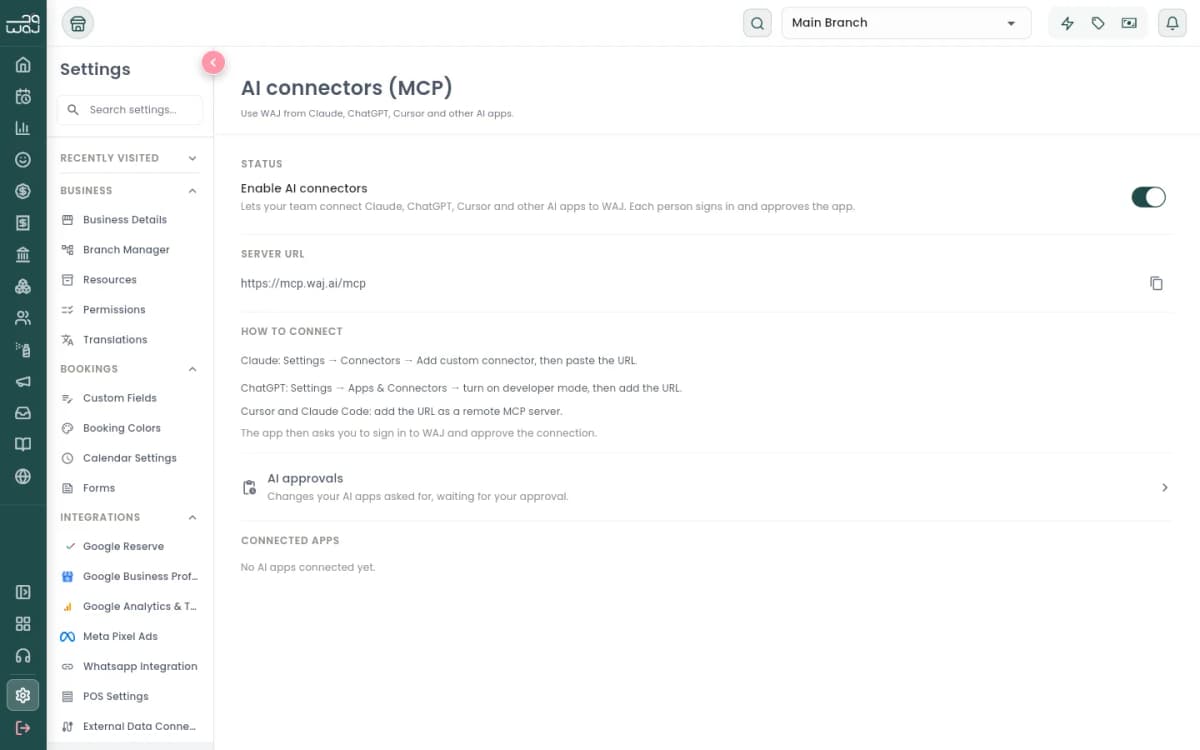
Ask in your own words
WAJ answers from your own data, for the branches and records your role can see.
Bookings and schedules
- “What’s booked tomorrow, and who is working?”
- “Find a free 60-minute slot with Sara on Thursday.”
- “Block Sara’s calendar tomorrow from 2 to 4 pm for training.”
Sales and reports
- “How did this month compare with last month?”
- “Which services sold the most in the last 30 days?”
- “Export this month’s invoices to a CSV file.”
Clients
- “Who are my top 10 clients by spend this year?”
- “Which clients haven’t been back in 90 days?”
- “Find duplicate client records and merge them.”
Team
- “Which staff member had the most bookings last week?”
- “Add a day off for Ahmed next Monday.”
Services and stock
- “Add a 45-minute express facial at AED 250.”
- “What do I need to reorder?”
Marketing
- “Create an audience of clients who spent over AED 2,000 this year.”
- “Build a win-back workflow for clients who haven’t visited in 60 days.”
Connect in three steps
Each staff member connects with their own WAJ login and gets the access their role allows.
Turn on AI connectors in WAJ
The business owner opens Settings → AI connectors (MCP) in WAJ and switches on Enable AI connectors. This is done once for the whole business.
Add WAJ to your AI app
In Claude, add WAJ from the connector directory. In ChatGPT, Claude Code or Cursor, add the server URL.
https://mcp.waj.ai/mcpSign in and choose the access
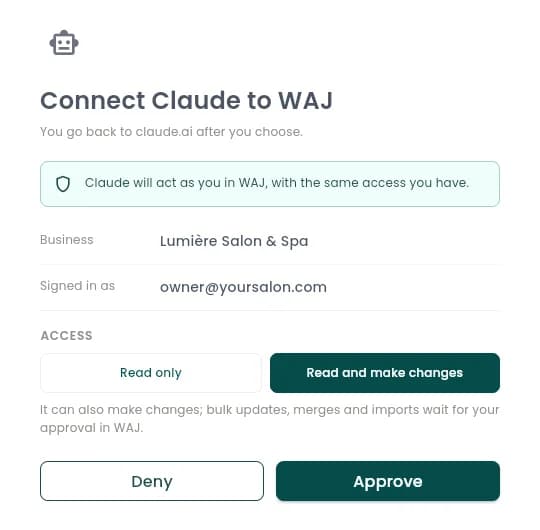
Sign in with your WAJ account, choose Read only or Read and make changes, and select Approve.
You decide what the AI app can do
- Your role sets the limits
- The AI app acts as you, with the same access your WAJ role gives you. Owners choose which roles can use WAJ AI in Settings → Permissions.
- Read only, or read and make changes
- You choose when you connect. Read only lets the AI app look things up without changing anything.
- Changes are confirmed in the chat
- Claude and ChatGPT ask before every change, so you can check it first.
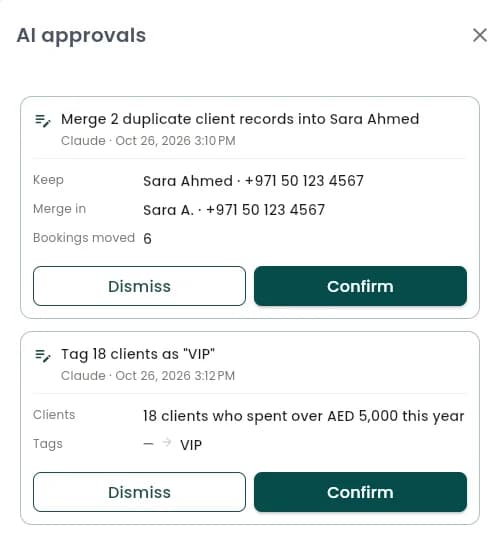
- Bigger changes wait for you in WAJ
- Bulk updates, merges, imports and anything customers will see, such as sending a campaign, wait under AI approvals until you confirm them. Requests expire after 24 hours.
- No money movement
- Refunds, payouts and other money transfers are not available to AI apps.
- Revoke at any time
- Connected apps lists every AI app, who connected it and when it was last used. Revoke one, or turn off AI connectors to stop them all at once.
Six ready-made reviews
Each one turns your WAJ figures into a review you can act on. Run it from the WAJ menu in Claude, or ask for it in your own words in any app.
- Sales analysis
- Revenue against the previous period, best and declining services, payment methods and money still owed.
- Staff performance
- Revenue, bookings, booked versus scheduled hours and client retention for each staff member.
- Business trends
- Weekly revenue over the last 8 weeks, rising and falling services, new versus returning clients and next week’s bookings.
- Daily briefing
- Today’s bookings by staff member, yesterday’s sales, money owed and gift cards expiring this week.
- Client retention
- Returning clients, how new clients hold up month by month, and clients at risk, with a win-back audience when you ask for one.
- Stock check
- Out-of-stock and low-stock items, product sales by category and product cost per service.
Works with the AI apps you use
Claude
Listed in Claude’s connector directory. Works on the web, desktop and mobile.
Setup stepsChatGPT
Add WAJ as a custom MCP server in ChatGPT on the web.
Setup stepsClaude Code
Add WAJ from the terminal, then run /mcp to sign in.
claude mcp add --transport http waj https://mcp.waj.ai/mcpCursor
Add the server URL as a new MCP server in Cursor’s settings and sign in when asked.
https://mcp.waj.ai/mcp
Questions about AI connectors
What is the WAJ AI connector?
+
Which AI apps work with WAJ?
+
What do I need to get started?
+
Can my staff connect too?
+
What can the AI app change?
+
Can the AI app issue refunds or move money?
+
What happens to my clients’ data?
+
Can I ask in Arabic?
+
Calendar & Bookings
Staff Management
Customer Management
Online Bookings
Reports & Analytics
AI Assistant
Website Builder
Cash Register
Mobile Apps
Payments
Calendar & Bookings
Staff Management
Customer Management
Online Bookings
Reports & Analytics
AI Assistant
Website Builder
Cash Register
Mobile Apps
Payments
Customer Forms
Memberships
Client Portal
Inventory
Expenses
Sales
Multi-Branch Manager
Payroll & Commissions
Multilingual Support
Offers & Packages
WhatsApp Automation
Referral Program
Rewards Program
Gift Cards
New to WAJ?
WAJ runs bookings, payments, staff, inventory and marketing for salons, spas and clinics.
14 дней бесплатно • Карта не требуется • Отмена в любое время