Your Online Profile and Booking Website
Overview
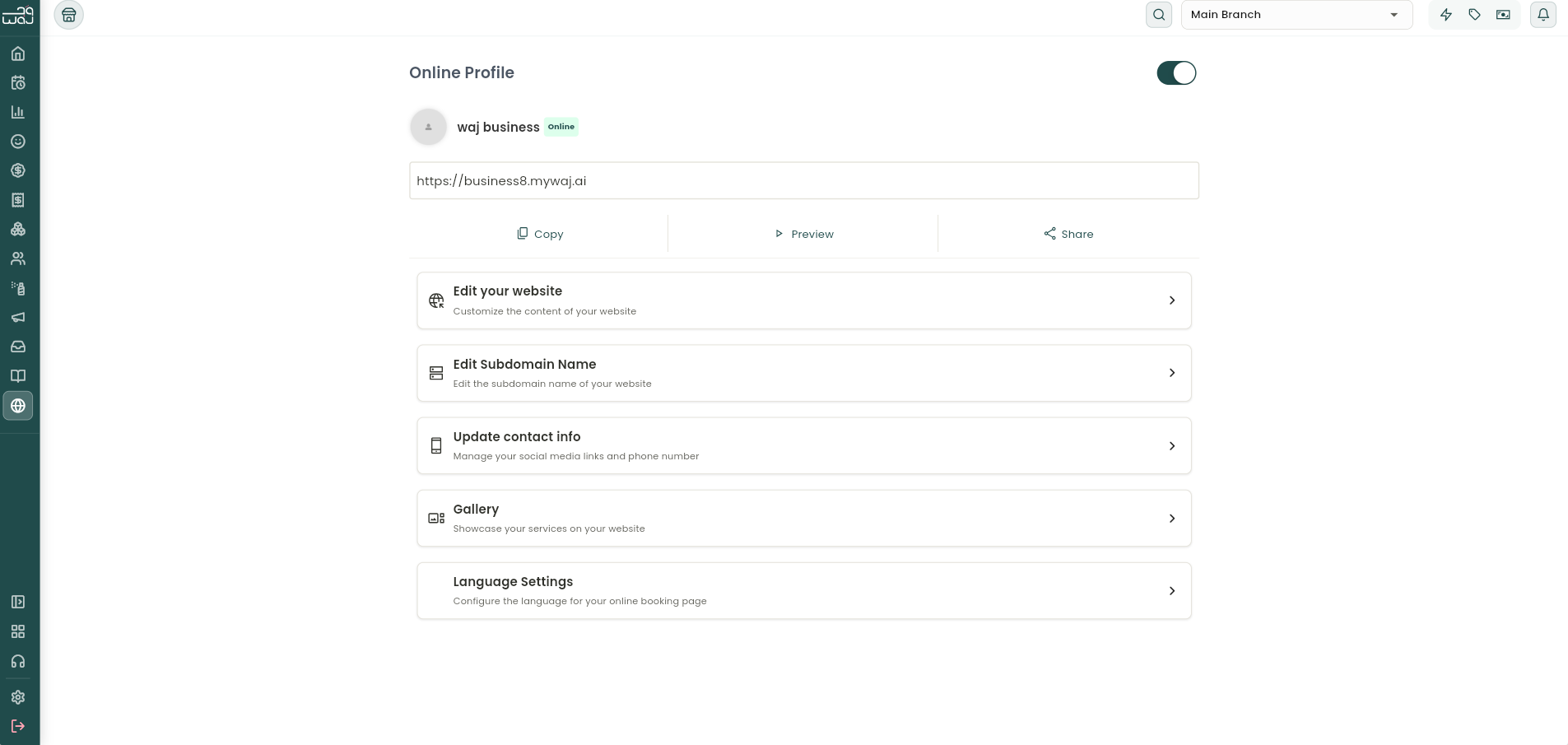
The Online Profile screen is where a business manages its public-facing booking website from inside the WAJ app, the control panel for its online presence. (The full website builder and what customers see when booking online is covered separately; this screen only covers what's managed from the main app.)
Turning the profile on or off
A toggle at the top of the screen switches the public profile ONLINE or OFFLINE. Turning it off temporarily pauses online bookings, customers can't reach the booking site while it's off. This requires the "Enable/Disable online profile" permission. Below the toggle, the business identity is shown at a glance: logo (tap to change), business name, and web address (either the WAJ subdomain or a custom domain, if one is set up). Next to the address, three quick actions let you Copy the link to the clipboard, Preview the live site in-app, and Share the link through the device's share menu.


What you can manage from here
A set of menu cards jump into different parts of the online presence. Each only appears with the matching permission:
- Edit your website: opens the full website editor in the browser to customize site content. Requires the "Can edit website" permission.
- Edit Subdomain Name: change the web address customers use to find the booking site. Requires the "Can change subdomain name" permission.
- Update contact info: add or update Facebook, Instagram, X, and TikTok usernames, plus the public contact number.
- Gallery: upload and arrange photos showcasing services on the website, and choose cover images.
- Language Settings: set the language the online booking page displays in.
No-Show Protection
From profile settings, No-Show Protection can be turned on to reduce no-shows by charging a fee when a client books online but doesn't show up. Turning on the toggle and setting a percentage of the booking cost means that percentage is deducted from the payment method used to book if the client doesn't attend. A confirmation shows once settings are saved.
Notes & limitations
Most online-profile actions are gated by permissions ("Can edit website", "Can change subdomain name", "Enable/Disable online profile"), so staff only see what their role allows. If a custom domain is configured, the profile and edit links use that custom domain instead of the default subdomain.
Follow WAJ on Google
Add WAJ as a preferred source to see more of our articles in your Google Search results, marked with a "preferred" badge.