
We Removed the Canvas: Building AI Agents by Conversation over MCP
WAJ Team
October 22, 2026

Most agent platforms give you a canvas. You drag a model node, wire it to a tool node, wire that to a retriever, and the picture is the agent. We built ours without one. In WAJ AI Engine you describe the agent in a conversation, and an AI assistant builds it, tests it and changes it when you ask.
WAJ AI Engine is open source under Apache-2.0: github.com/waj-1/ai-engine. You can try it in one click, with no sign-up, at engine-demo.waj.ai.
This post is about why building by conversation works, and the four things that broke before it did.
Why is an agent a row and not a graph?
The decision that makes conversation possible is a boring one. An agent in the engine is a row of configuration:
- its instructions
- a model
- the tools it may use, taken from the MCP servers you connect
- a knowledge base it can search
- other agents it can hand off to
There is no code per agent and no graph to lay out. Changing an agent is an edit to a row.
A row has a property a canvas does not: it can be changed through a small set of well-named operations. Create from a template. Write a new version of the instructions. Attach these four actions from that tool server. Run this test suite. Those operations are the admin portal's buttons, and they are also the engine's admin API.

How does an AI assistant build an agent over MCP?
We expose those operations as an MCP server at /mcp: 55 tools, the same steps as the portal. Connect Claude Code, Cursor or any MCP client and you can say:
Build me a support agent that checks outages. Give it the billing knowledge base. Test it. Why did that case fail? Name it Ali.
Each line becomes a handful of tool calls. The assistant doing the work is whichever one you already use. If you have connected an assistant to WAJ before, this works the same way as our WAJ MCP connector.
In the public demo we went one step further and put an assistant in the portal itself, in a side panel called Build with AI. It is not special code. It is an agent on the engine, configured like any other, whose tools are an allow-listed subset of the admin tools. It builds agents with the engine's own interface.
What broke first?
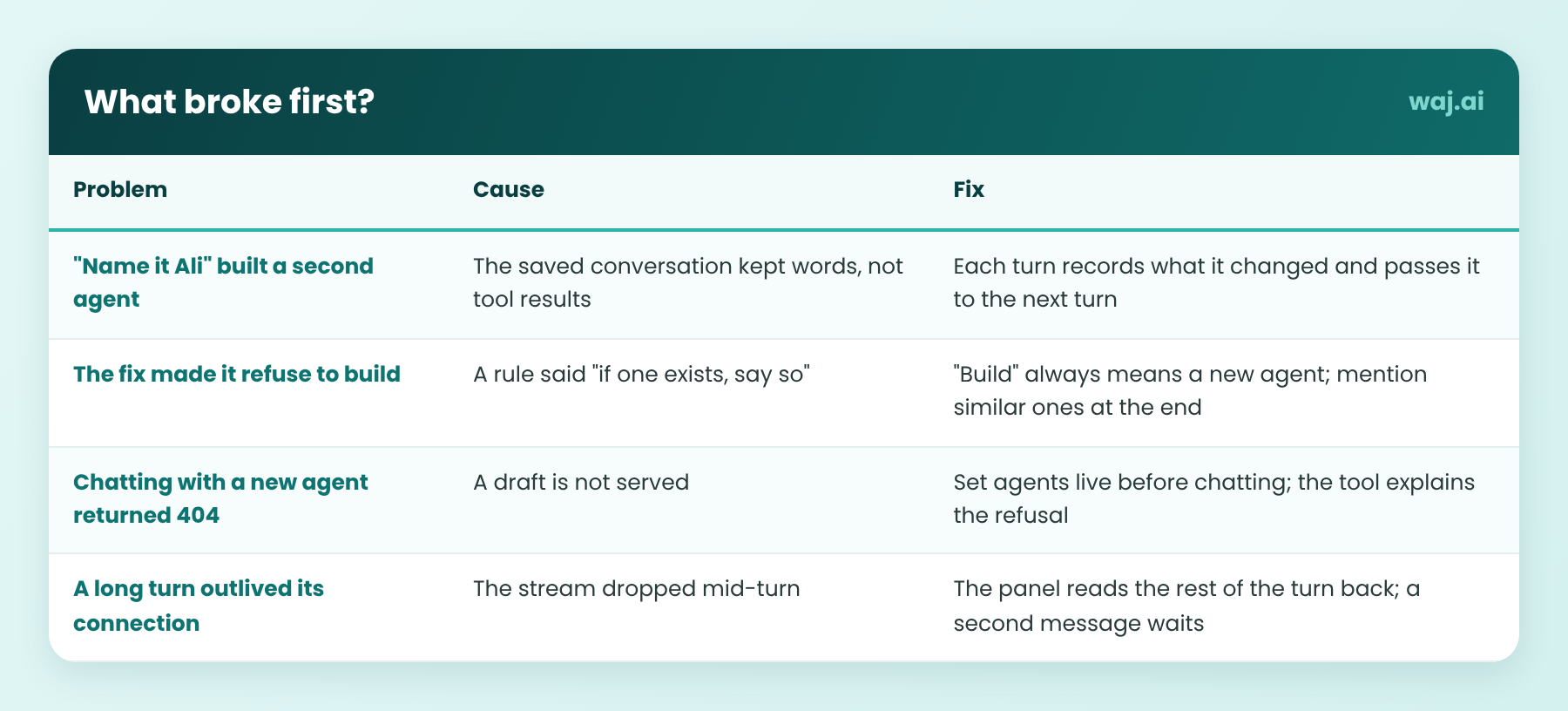
Four problems showed up as soon as real people used the panel. Here they are in one place, then one by one.
1. "Name it Ali" built a second agent
The first real user of the panel asked for a support agent, then typed "name it ali". The assistant created a new agent called Ali.
The cause was in what a turn remembers. The saved conversation held the user's words and the assistant's final text. It did not hold the tool results, so the id of the agent it had just created was gone by the next turn. From the model's side, "name it ali" arrived with nothing to name.
The fix was not a bigger prompt. Each turn now records what it changed, and the next turn in that conversation is handed a short list: "Created Outage Support Agent (profile id …)". We also wrote the rule down in the assistant's instructions: a follow-up is about the agent you were just working on.
2. The fix for that made it refuse to build anything
Our first version of the rule said: before you create an agent, look at the existing ones, and if one already does the job, say so. The demo has a suggestion button that reads "Build me a support agent that checks outages". With the new rule the assistant answered: a support agent that checks outages already exists.
It was right, and useless. We changed the rule to what people mean: "build" always means a new agent; mention the similar one in a line at the end.
A rule for a model is a product decision. Test it against the first thing a new user will click.
3. Chatting with a brand-new agent returned 404
The assistant's natural order was: create, write instructions, chat with it to check, then publish. But a draft is not served, so the chat step failed with a bare "endpoint returned HTTP 404".
Two fixes. The instructions now say a new agent is set live before it is chatted with. And the tool refuses a chat with a draft with a sentence that says why and what to do, so a model that forgets the order can recover in one step.
Error messages for tools are prompts. Write them for the reader that will act on them.
4. A long turn outlived its connection
Building an agent takes ten or more tool calls. One user's stream dropped mid-turn and the panel showed "network error". They typed the next message while the first turn was still running on the server, which is how problem 1 got worse.
The turn was already independent of the browser's connection. What was missing was the other half: the panel now reads the rest of a turn back from the server when its stream drops, and a second message waits while the first is still running.
How do tests make AI-built agents safe?
Letting a model edit production configuration sounds reckless. Two things make it reasonable.
First, the tools have tiers. Reads run freely. Writes that take a confirm flag only preview without it. Promotion to production always asks.
Second, every change can be measured. A test suite is a list of cases: a question, plus words the answer must contain, a tool that must be called, or a rubric for a judge model. The assistant can run a suite against a draft of the instructions, or against another model, before the change serves anyone, and compare two runs case by case. "Make it shorter" becomes: write a new version, run the suite on it, show what it fixed and what it broke, apply it if it is better.

What would we tell someone building the same thing?
- Make the thing being built a small, flat object. If a model cannot describe a change in one tool call, a person cannot review it either.
- Give the assistant the same interface people use, not a private one. Ours found two bugs in the portal's own API.
- Persist what a turn did, not only what it said.
- Keep the tool list short for the built-in assistant. Ours sees about a third of the 55 tools, with the arguments it does not need removed from the schema.
- Cap the steps per message, and say so in plain words when the cap is hit.
What is weak today?
It is an early release. Small local models struggle with a tool list this long. Fifty-five tools is a lot even for a strong model, and we would like to hear how others keep a large tool surface usable. And a canvas does one thing better than a conversation: it shows the whole flow at a glance. We show an agent as a page of settings instead.
The same engine runs WAJ's own chat and voice agents, including the AI voice agent our salon and clinic clients use.
Frequently asked questions
Can I build an AI agent without a drag-and-drop canvas?
Yes. In WAJ AI Engine an agent is a row of settings (instructions, a model, tools from MCP servers, a knowledge base and hand-offs), so you can build it in the admin portal or by asking an AI assistant to do it over MCP.
Which AI assistants can build agents on WAJ AI Engine?
Any MCP client. The engine exposes its admin operations as an MCP server at /mcp, so Claude Code, Cursor and other MCP clients can create, test and change agents.
Is WAJ AI Engine free to self-host?
Yes. It is open source under Apache-2.0 and runs with docker compose up. If you would rather not run it yourself, WAJ can host it for you.
Try it
Try the conversation in the live demo, or point your own assistant at a local install:
git clone https://github.com/waj-1/ai-engine.git
cd ai-engine
docker compose up
Follow WAJ on Google
Add WAJ as a preferred source to see more of our articles in your Google Search results, marked with a "preferred" badge.