
What is CRM? The Complete Guide for Businesses Managing Leads and Sales Teams
WAJ Team
July 14, 2026
.png&w=1200&q=75)
In one sentence: A CRM (Customer Relationship Management) system is software that captures every lead and customer interaction in one place so your team can respond faster, follow up consistently, and convert more prospects into revenue.
If your business generates leads and runs a sales team, the difference between growth and stagnation usually is not the number of leads you get. It is what happens in the minutes and days after a lead arrives. This guide explains what a CRM is, how it works, the metrics that prove it is working, the mistakes that quietly waste money, and what a genuinely modern, mobile-first CRM should deliver in 2025 and beyond.
What is a CRM? (Definition)
Definition: A CRM, or Customer Relationship Management system, is a central platform that stores and organizes every interaction between your business and its leads and customers — calls, messages, emails, meetings, and purchases. It gives sales teams a single source of truth for managing relationships, tracking deals through a pipeline, and automating follow-up so no opportunity is forgotten.
A CRM is not a contact list and it is not a spreadsheet. A spreadsheet records data; a CRM acts on it assigning leads, reminding reps to follow up, surfacing which deals are stuck, and showing managers the real state of the pipeline.
Why it matters: Revenue is created in the gaps between touchpoints. When those gaps are managed by memory and manual notes, leads leak out of the process. A CRM turns an informal, person-dependent sales process into a repeatable system that survives busy weeks, staff turnover, and scale.
How it works: Leads enter from your website, ads, WhatsApp, calls, or referrals. The CRM assigns each one to an owner, records every interaction on a timeline, moves the deal through defined pipeline stages, and triggers tasks and reminders so the next step always happens.
Example: A cosmetic clinic receives 40 inquiries a day across Instagram, WhatsApp, and its website. Without a CRM, receptionists juggle screenshots and notebooks; roughly a third of inquiries never get a proper follow-up. With a CRM, each inquiry becomes a lead assigned to a coordinator within seconds, with an automatic reminder to follow up in 24 hours if no booking is made.
Common mistakes: Treating the CRM as a database to fill in after the fact, rather than the tool used during the workday.
Best practice: Adopt a CRM your reps will actually open every day — which, in practice, means one that lives on their phone and notifies them the moment a lead needs action.
Quick answer: A CRM is software that centralizes all lead and customer interactions so a business can respond faster, follow up consistently, track deals through a sales pipeline, and convert more prospects into paying customers.
Why do businesses fail without a CRM?
Why it matters: Companies without a system don’t lose deals dramatically; they lose them invisibly. A missed follow-up looks like nothing happened — and that is exactly the problem.
Businesses without a CRM tend to fail at scale for predictable reasons:
- Slow first response. Studies of buyer behavior consistently show that the first business to respond wins a disproportionate share of deals. Manual processes routinely respond in hours; buyers have already moved on.
- Leads with no owner. When everyone can see a lead but no one owns it, nobody follows up.
- Follow-up by memory. A rep managing 60 open opportunities cannot reliably remember who to call on Thursday.
- No visibility for managers. Leaders discover a bad month at the end of the month, when it is too late to fix.
- Knowledge walks out the door. When a rep leaves, their relationships and context leave with them.
Example: A real estate company spends heavily on portal and ad leads. Reps chase the freshest leads and let older ones go cold. Over a quarter, thousands of paid leads are never contacted a second time. The company concludes “the leads are bad” and increases ad spend — treating a process problem as a traffic problem.
Best practice: Measure the cost of inaction. If you buy leads at a known cost per lead, an un-worked lead is a direct, quantifiable loss. A CRM’s first job is to make sure no paid lead is ever silently abandoned.
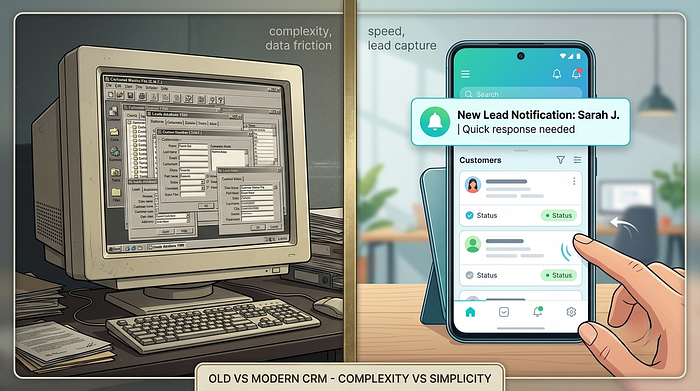
The evolution of CRM: from Rolodex to AI
Definition: CRM evolution describes the shift from manual contact records to on-premise sales databases, then to cloud software, then to mobile-first and AI-assisted platforms that guide reps toward the next best action.
- 1980s–1990s — Contact management. Digital Rolodexes and early “sales force automation” tools stored names and notes.
- Late 1990s–2000s — On-premise CRM & the ERP era. Large enterprises bolted CRM onto heavy, database-driven ERP suites. Powerful, but complex, expensive, and built for back-office administrators — not for a rep in the field.
- 2010s — Cloud CRM. Software moved to the browser, lowering cost and setup time and making CRM accessible to smaller teams.
- 2020s — Mobile-first + AI + conversational. Buyers now message businesses on WhatsApp and expect near-instant replies. Reps work from phones, not desks. Modern CRMs are built mobile-first, notify reps in real time, integrate messaging channels, and use AI to draft follow-ups, summarize conversations, and prioritize the leads most likely to convert.
Why it matters: Many CRMs sold today are still architected around the 2000s ERP mindset — desktop-centric, form-heavy, admin-oriented. That heritage is the single biggest reason sales reps quietly abandon their CRM. Understanding the evolution helps you avoid buying yesterday’s tool.
Key takeaway: The category didn’t just get more features — its center of gravity moved from the back office desktop to the rep’s phone.
Lead management: the heart of CRM
Definition: Lead management is the end-to-end process of capturing, assigning, qualifying, and nurturing potential customers until they either convert or are respectfully closed out — ensuring every lead receives a timely, tracked, and consistent response.
How it works — the lead lifecycle:
- Capture — a lead enters from ads, forms, WhatsApp, calls, walk-ins, or referrals.
- Assign — the CRM routes it to the right rep instantly (by territory, product, availability, or round-robin).
- Qualify — is this a real opportunity? Budget, need, timing, fit.
- Engage & follow up — structured touchpoints on a defined cadence.
- Convert or recycle — win the deal, or return it to nurturing for later reactivation.
Example: A marketing agency captures a demo request at 9:41 p.m. A mobile-first CRM pushes it to the on-duty rep’s phone; they send a WhatsApp reply within four minutes. The prospect, comparing three agencies, books with the one that answered first.
Common mistakes: Capturing leads but never defining who owns response or how fast. Volume without process just fills a database.
Best practice: Define a written speed-to-lead standard (for example, “every inbound lead contacted within 5 minutes during business hours”) and use the CRM to enforce and measure it.
Quick answer: Lead management is the process of capturing, assigning, qualifying, and following up with potential customers so that every lead gets a fast, consistent, tracked response — the single biggest driver of conversion for lead-based businesses.

The sales pipeline: turning activity into forecasting
Definition: A sales pipeline is a visual representation of every active deal organized by stage — from new lead to closed — so teams can see exactly where each opportunity stands and what action moves it forward.
Typical pipeline stages: New Lead → Contacted → Qualified → Meeting/Consultation → Proposal/Quote → Negotiation → Won or Lost.
Why it matters: A pipeline converts a vague feeling (“things are okay”) into a countable reality (“we have 38 deals in negotiation worth X, and 12 have been stuck for two weeks”). It is the difference between hoping and managing.
How it works: Each deal has a stage, a value, an owner, and an expected close date. As reps advance deals, the pipeline updates in real time, feeding dashboards and forecasts.
Example: An automotive dealer notices 60% of deals stall at “Test Drive Scheduled.” That single insight — visible only because of a pipeline — reveals a follow-up gap after test drives, which becomes a coaching priority.
Common mistakes: Too many stages (reps game them), or stages that describe internal steps instead of buyer commitment.
Best practice: Keep 5–7 stages, define exit criteria for each, and require that stalled deals surface automatically.
Opportunity management and sales forecasting
Definition: Opportunity management is the discipline of tracking each qualified deal’s value, stage, probability, and next step; sales forecasting uses that pipeline data to predict future revenue.
Why it matters: Forecasting is only as trustworthy as the pipeline behind it. Clean opportunity data lets leaders plan hiring, inventory, and cash flow with confidence instead of guesswork.
How it works: Each opportunity carries an expected value and a stage-based probability. The CRM aggregates these into a weighted forecast and flags risk — deals with no recent activity, or past their expected close date.
Example: An insurance agency forecasts renewals by combining policy value, renewal date, and last-contact date. The CRM flags 45 renewals with no touch in 30 days — a concrete, prioritized retention list.
Best practice: Forecast from activity, not optimism. A deal with no logged interaction in three weeks is not “90% to close,” regardless of what the rep hopes.
Follow-up systems: where most revenue is actually lost
Definition: A follow-up system is a structured set of scheduled touchpoints with reminders and automation that ensures every lead and open deal is contacted at the right time, without relying on human memory.
Why it matters: The majority of sales require multiple follow-ups, yet most reps stop after one or two. The gap between “leads worth following up” and “leads actually followed up” is where revenue quietly disappears.
How it works: When a rep logs an interaction, the CRM prompts the next step and schedules a task. If a lead goes untouched past a threshold, it resurfaces automatically. On a mobile-first CRM, the reminder is a push notification the rep sees immediately — not an email buried in an inbox.
Example: A laser/aesthetic center’s coordinator finishes a consultation and the CRM auto-creates a follow-up task for 48 hours later. The push reminder fires; a two-minute WhatsApp message recovers a booking that would otherwise have been forgotten.
Common mistakes: Relying on reps to set their own reminders manually. Under pressure, that is the first habit to collapse.
Best practice: Automate the cadence. The system, not the person, should remember when the next touch is due.
Lead distribution: getting the right lead to the right rep instantly
Definition: Lead distribution (or lead routing) is the automatic assignment of incoming leads to the correct salesperson based on rules such as territory, product line, language, availability, or round-robin balance.
Why it matters: Every minute a lead sits unassigned is a minute a competitor can win it. Manual assignment (“someone grab this”) both wastes time and creates unfairness that erodes team trust.
How it works: The CRM applies routing rules the instant a lead arrives, notifies the assigned rep on their phone, and logs ownership so accountability is unambiguous.
Example: A multi-branch clinic routes Riyadh leads to the Riyadh team and Jeddah leads to the Jeddah team automatically, in seconds, with a push notification to the assigned coordinator.
Best practice: Pair instant routing with an SLA: if the assigned rep doesn’t act within X minutes, the lead reassigns or escalates.
Sales automation and AI CRM
Definition: Sales automation uses software rules to handle repetitive work assignment, reminders, status updates, and templated messages — so reps spend time selling. An AI CRM adds a layer of intelligence: drafting replies, summarizing conversations, and highlighting the leads most likely to convert.
Why it matters: Reps typically spend a large share of their day on administration rather than selling. Automation reclaims that time; AI focuses it on the right opportunities.
How it works — automation vs. AI:
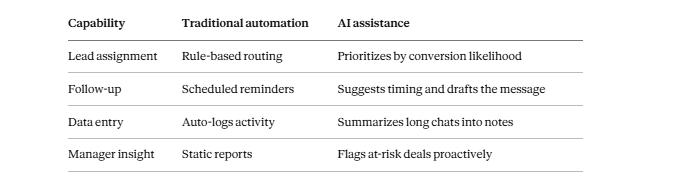
Example: After a 30-message WhatsApp thread, an AI assistant summarizes the customer’s needs and objections into three lines and drafts a follow-up — turning ten minutes of catch-up into thirty seconds.
Common mistakes: Expecting AI to replace judgment. It accelerates good reps; it does not fix a broken process.
Best practice: Automate the mechanical, let AI handle the repetitive-cognitive, and keep humans on relationships and decisions.
Mobile CRM: why the phone is now the primary workspace
Definition: A mobile-first CRM is designed primarily for smartphones, giving reps full access to leads, pipeline, communication history, and notifications wherever they are — not as a stripped-down companion to a desktop app.
Why it matters: Field sales reps, clinic coordinators, real estate agents, and automotive salespeople are rarely at a desk. If the CRM requires sitting at a computer, it gets updated late (or never), and its data is always stale.
How it works: Native mobile apps deliver instant push notifications for new leads and due follow-ups, let reps update deals between meetings, and keep the full customer timeline one tap away.
Example: A real estate agent finishes a viewing, opens the app in the car, logs the client’s reaction, and books the next viewing — before the memory fades. The manager sees it update live.
Common mistakes: Buying a desktop CRM and assuming reps will “log it later.” Later rarely comes.
Best practice: Judge a CRM by its mobile experience first. If the phone app is an afterthought, adoption will be too.
Quick answer: A mobile-first CRM is built primarily for smartphones so sales reps can receive new leads, follow-up reminders, and full customer history in real time — dramatically improving response speed and data accuracy compared to desktop-only systems.
CRM KPIs: the metrics that prove it’s working
Definition: CRM KPIs are the measurable indicators — such as first response time, follow-up rate, conversion rate, pipeline value, and sales cycle length — that reveal whether your sales process is healthy and improving.
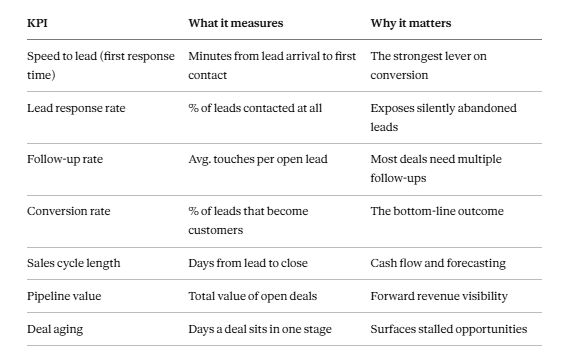
Best practice: Pick three KPIs to improve this quarter (start with speed to lead, follow-up rate, and conversion rate). A CRM should make each visible on a dashboard without manual reporting.
CRM implementation: how to roll it out without pain
Definition: CRM implementation is the process of configuring, adopting, and embedding a CRM into daily work — including data setup, pipeline design, rule configuration, training, and adoption tracking.
How it works — a practical roadmap:
- Define the process first. Map your stages and follow-up cadence before configuring software.
- Start lean. Turn on lead capture, assignment, pipeline, and reminders. Add complexity later.
- Import clean data. Deduplicate and standardize before migrating.
- Train on the phone. For a mobile-first team, train on the app they’ll actually use.
- Track adoption. Measure daily active use in week one; adoption is the real success metric.
Example: A company that “went live” with 40 fields per lead saw reps skip data entry entirely. Cutting to 6 required fields tripled data completeness within two weeks.
Common mistakes: Over-configuring, migrating dirty data, and treating go-live as the finish line instead of the start.
Best practice: Optimize the first 30 days for adoption, not for feature coverage. A simple CRM that everyone uses beats a powerful one that sits empty.
The most common CRM mistakes (and how to avoid them)
- Choosing a desktop-heavy, ERP-style CRM for a mobile sales team. → Choose mobile-first.
- No defined response-time standard. → Set and measure speed to lead.
- Manual lead assignment. → Automate routing.
- Follow-ups left to memory. → Automate reminders with push notifications.
- Too many required fields. → Keep entry light so reps comply.
- No manager visibility. → Use real-time dashboards, not month-end reports.
- Ignoring the channel customers actually use. → Integrate WhatsApp and messaging.
- Treating adoption as automatic. → Track daily usage and coach to it.
CRM best practices checklist
- Every inbound lead is captured automatically, from every channel.
- Leads are assigned to an owner within seconds.
- A written speed-to-lead standard exists and is measured.
- Follow-up tasks are auto-created and pushed to reps’ phones.
- The pipeline has 5–7 clear stages with exit criteria.
- Stalled deals surface automatically.
- Managers see live dashboards, not month-end spreadsheets.
- WhatsApp and messaging history live inside the CRM.
- Required fields are minimal.
- Adoption (daily active use) is tracked as the #1 success metric.
Where WAJ CRM fits
Everything above describes what a modern CRM should do. WAJ CRM was built around exactly this reality — that for businesses managing leads and sales teams, the deciding factors are response speed, consistent follow-up, accountability, and adoption.
WAJ is mobile-first by design. Native mobile apps put the full CRM — leads, pipeline, timeline, and follow-ups — in the rep’s pocket. Because the experience is built for the phone rather than shrunk down from a desktop tool, reps actually use it, which is the prerequisite for every other benefit.
WAJ compresses speed to lead. Instant push notifications and lead assignment in seconds mean an inbound inquiry reaches the right rep immediately — addressing the first-response gap that quietly costs lead-driven businesses the most revenue.
WAJ makes follow-up automatic. Follow-up reminders and sales task management ensure the next step always happens, without depending on a busy rep’s memory. Its WhatsApp integration keeps conversations on the channel customers actually use, with the full communication history and activity timeline in one place.
WAJ creates accountability and visibility. Clear lead ownership, an activity timeline, multi-user collaboration, and sales performance dashboards give managers a live view of pipeline health and team performance — replacing month-end guesswork with real-time insight.
WAJ is fast to adopt. Compared with heavy, ERP-based CRMs that are complex, desktop-centric, and slow to roll out, WAJ is designed to be easy enough that sales reps adopt it quickly — and AI assistance reduces the manual work that usually causes reps to disengage.
The result is a CRM that reflects how modern sales teams actually work: on their phones, responding in minutes, following up consistently, and accountable to a shared, live picture of the pipeline.
Comparison: Traditional ERP-style CRM vs. Modern Mobile-First CRM
Press enter or click to view image in full size
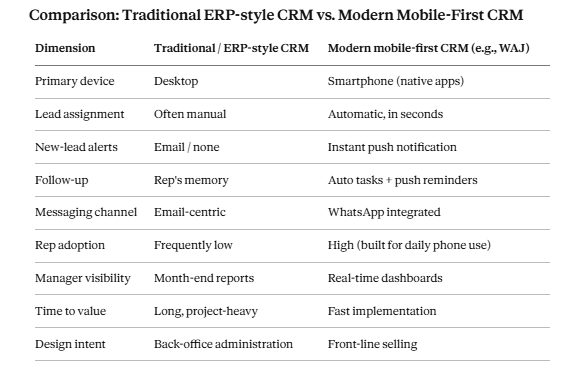
This comparison describes general category differences, not a claim about any specific competing product.
Frequently Asked Questions
What is a CRM in simple terms? A CRM is software that keeps all your leads and customers — and every conversation with them — in one place, then helps your team respond faster and follow up consistently so more leads become customers.
What is the difference between a CRM and an ERP? An ERP manages back-office operations (finance, inventory, HR). A CRM manages the front-office relationship with leads and customers (sales, follow-up, pipeline). ERP-based CRMs tend to be complex and desktop-oriented, which is why sales teams often adopt purpose-built, mobile-first CRMs instead.
Do small businesses need a CRM? Yes — often more than large ones. Small teams can’t afford to lose paid leads to missed follow-ups. Even a simple CRM that ensures fast response and consistent follow-up usually pays for itself quickly.
Why don’t sales reps use our CRM? Almost always because it’s built for desktops and administrators, requires too much data entry, and doesn’t fit how reps work. Mobile-first CRMs with minimal required fields and push notifications see far higher adoption.
What does AI do in a CRM? AI drafts follow-up messages, summarizes long conversations into short notes, and highlights which leads are most likely to convert — reducing admin time and helping reps focus on the right opportunities.
How fast should we respond to a new lead? As fast as possible — ideally within a few minutes during business hours. First-response speed is one of the strongest predictors of whether you’ll win the deal, which is why instant assignment and push notifications matter.
Is a spreadsheet enough instead of a CRM? A spreadsheet stores data but doesn’t assign leads, remind reps, or surface stalled deals. It works until volume grows — at which point follow-ups start slipping and leads get lost.
How long does CRM implementation take? It depends on complexity. A lean, mobile-first rollout focused on lead capture, assignment, pipeline, and reminders can go live quickly; heavy ERP-style deployments can take months. Prioritize adoption over feature count.
Key Takeaways
- A CRM centralizes lead and customer interactions so teams respond faster, follow up consistently, and convert more.
- The biggest revenue lever for lead-driven businesses is speed to lead plus consistent follow-up — both of which depend on the CRM being used in real time.
- Traditional ERP-style CRMs often fail on adoption because they are complex and desktop-centric.
- A mobile-first CRM with instant assignment, push notifications, WhatsApp integration, automated follow-ups, and live dashboards fits how modern sales teams actually work.
- WAJ CRM is built around these principles — helping companies respond faster, manage leads efficiently, improve accountability, and increase conversions.
Follow WAJ on Google
Add WAJ as a preferred source to see more of our articles in your Google Search results, marked with a "preferred" badge.